Multiple Voices
Example script (scamp): examples/Notation & engraving/Special notations/voices.py
Download: voices.py
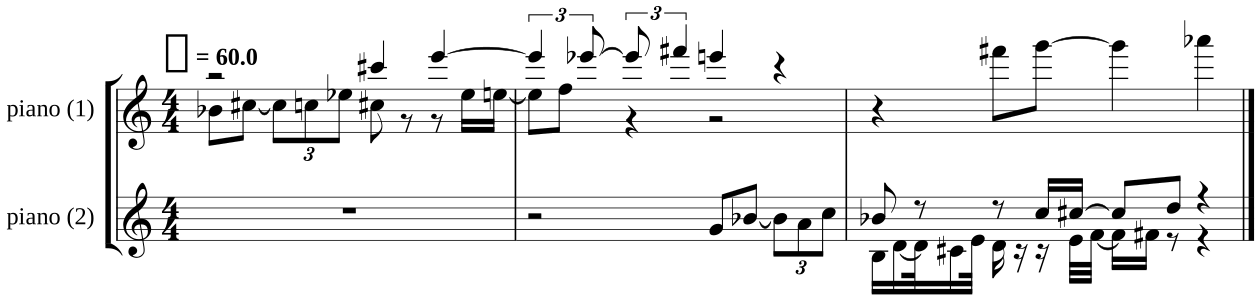
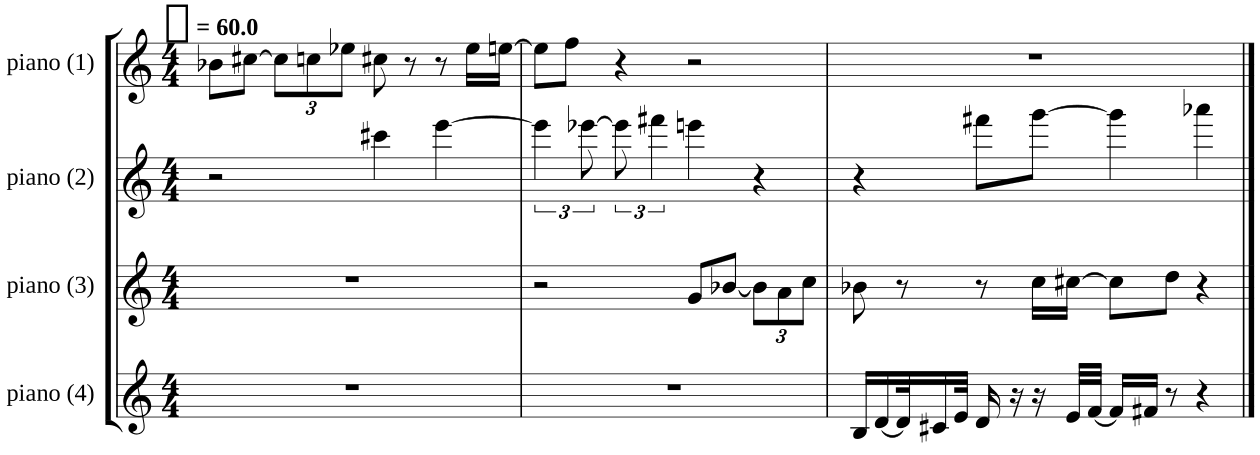
Demonstration of how to place notes in specific voices within a staff/part. Named voices keep notes together in the same voice, and numbered voices determine exactly which voice they go in. By default SCAMP allows up to four voices per staff, but this can easily become quite messy. Set engraving_settings.max_voices_per_staff to limit the number of voices per staff, placing overflow voices on separate staves.
Topics: Notation & engraving › Special notations

from scamp import *

s = Session()

piano = s.new_part("piano")

melody = (
    (0, 0.5), (3, 1/2 + 1/3), (2, 1/3), (5, 1/3), (3, 0.5), (None, 1.0), (5, 0.25), (6, 0.75), (7, 0.5)
)


def _do_melody(start_pitch, dilation_factor=1.0, properties=None):
    for interval, dur in melody:
        piano.play_note(start_pitch + interval if interval is not None else None,
                        0.7,
                        dur * dilation_factor,
                        properties)


def fork_melody(start_pitch, dilation_factor=1.0, properties=None):
    fork(_do_melody, args=(start_pitch, dilation_factor, properties))


s.start_transcribing()

fork_melody(70, properties="voice: A")
wait(2)
fork_melody(85, 2, properties="voice: B")
wait(4)
fork_melody(67, properties="voice: C")
wait(2)
fork_melody(59, 0.5, properties="voice: 4")
wait_for_children_to_finish()

perf = s.stop_transcribing()

# default: allow up to 4 voices per staff, so all four fit on one staff
perf.to_score().show()

# cap at 2 voices per staff, so the overflow voices spill onto a second staff
engraving_settings.max_voices_per_staff = 2
perf.to_score().show()

# cap at 1 voice per staff, so every voice gets its own staff
engraving_settings.max_voices_per_staff = 1
perf.to_score().show()